Reimagining the Restaurant Experience, From Order to Payment
Reimagining the Restaurant Experience, From Order to Payment
Client
SplitEase
Role
Product designer
Platform
Web app
Timeline
2 Months
Year
2025

Introduction
Introduction
SplitEase is a QR-based dining platform that lets guests order, reorder, and split the bill, all from their phones, while giving restaurant staff a real-time dashboard to manage every table.
SplitEase was built to fix a problem most diners know too well: long waits for the bill, awkward payment splits, and no visibility into what was happening across the floor.
The goal was simple. Guests should be able to sit down, scan a code, and order without thinking twice. No downloads, no accounts, nothing in the way. For the restaurant, a tool to manage orders, tables, and payments in real time.
SplitEase is a QR-based dining platform that lets guests order, reorder, and split the bill, all from their phones, while giving restaurant staff a real-time dashboard to manage every table.
SplitEase was built to fix a problem most diners know too well: long waits for the bill, awkward payment splits, and no visibility into what was happening across the floor.
The goal was simple. Guests should be able to sit down, scan a code, and order without thinking twice. No downloads, no accounts, nothing in the way. For the restaurant, a tool to manage orders, tables, and payments in real time.
Introduction
SplitEase is a QR-based dining platform that lets guests order, reorder, and split the bill, all from their phones, while giving restaurant staff a real-time dashboard to manage every table.
SplitEase was built to fix a problem most diners know too well: long waits for the bill, awkward payment splits, and no visibility into what was happening across the floor.
The goal was simple. Guests should be able to sit down, scan a code, and order without thinking twice. No downloads, no accounts, nothing in the way. For the restaurant, a tool to manage orders, tables, and payments in real time.

The Challenge
The Challenge
Designing for a restaurant environment means designing for chaos. Guests arrive together but order differently, pay separately, and leave at different times. The system had to account for all of it without ever feeling complicated to the person holding their phone at a dinner table.
A few problems stood out:
Payment. How do you let multiple people split a bill across different devices without requiring them to coordinate in real time?
Table Management. How do you give restaurant staff a clear, at-a-glance view of every table in the room, across different screen sizes, without building something that takes weeks to learn?
Staff Control. How do you give staff not just visibility over the floor, but the tools to act on what they see, without adding complexity to an already demanding job?
Designing for a restaurant environment means designing for chaos. Guests arrive together but order differently, pay separately, and leave at different times. The system had to account for all of it without ever feeling complicated to the person holding their phone at a dinner table.
A few problems stood out:
Payment. How do you let multiple people split a bill across different devices without requiring them to coordinate in real time?
Table Management. How do you give restaurant staff a clear, at-a-glance view of every table in the room, across different screen sizes, without building something that takes weeks to learn?
Staff Control. How do you give staff not just visibility over the floor, but the tools to act on what they see, without adding complexity to an already demanding job?
The Challenge
Designing for a restaurant environment means designing for chaos. Guests arrive together but order differently, pay separately, and leave at different times. The system had to account for all of it without ever feeling complicated to the person holding their phone at a dinner table.
A few problems stood out:
Payment. How do you let multiple people split a bill across different devices without requiring them to coordinate in real time?
Table Management. How do you give restaurant staff a clear, at-a-glance view of every table in the room, across different screen sizes, without building something that takes weeks to learn?
Staff Control. How do you give staff not just visibility over the floor, but the tools to act on what they see, without adding complexity to an already demanding job?


The Solution
The Solution
The product had two very different users with two very different needs. For guests, that meant a session that started the moment they scanned a QR code and guided them through ordering and payment without ever asking them to create an account or download anything.
For staff, it meant a dashboard that did more than display information. Order status, table activity, and payment progress were all visible at a glance, but staff could also act directly from the dashboard, managing tables, stepping in when guests needed help, and keeping the floor running smoothly.
The product had two very different users with two very different needs. For guests, that meant a session that started the moment they scanned a QR code and guided them through ordering and payment without ever asking them to create an account or download anything.
For staff, it meant a dashboard that did more than display information. Order status, table activity, and payment progress were all visible at a glance, but staff could also act directly from the dashboard, managing tables, stepping in when guests needed help, and keeping the floor running smoothly.
The Solution
The product had two very different users with two very different needs. For guests, that meant a session that started the moment they scanned a QR code and guided them through ordering and payment without ever asking them to create an account or download anything.
For staff, it meant a dashboard that did more than display information. Order status, table activity, and payment progress were all visible at a glance, but staff could also act directly from the dashboard, managing tables, stepping in when guests needed help, and keeping the floor running smoothly.
SPLITTING THE BILL
SPLITTING THE BILL
The hardest UX problem on the guest side was payment. When multiple people share a table, splitting the bill across different devices without real-time coordination is genuinely difficult to get right.
The solution was to make the QR code the persistent anchor for the entire table session. Guests could arrive at a shared bill in two ways. One person could place a single order on behalf of the entire group from their own phone. Or each guest could scan the same QR code and place their own order independently.
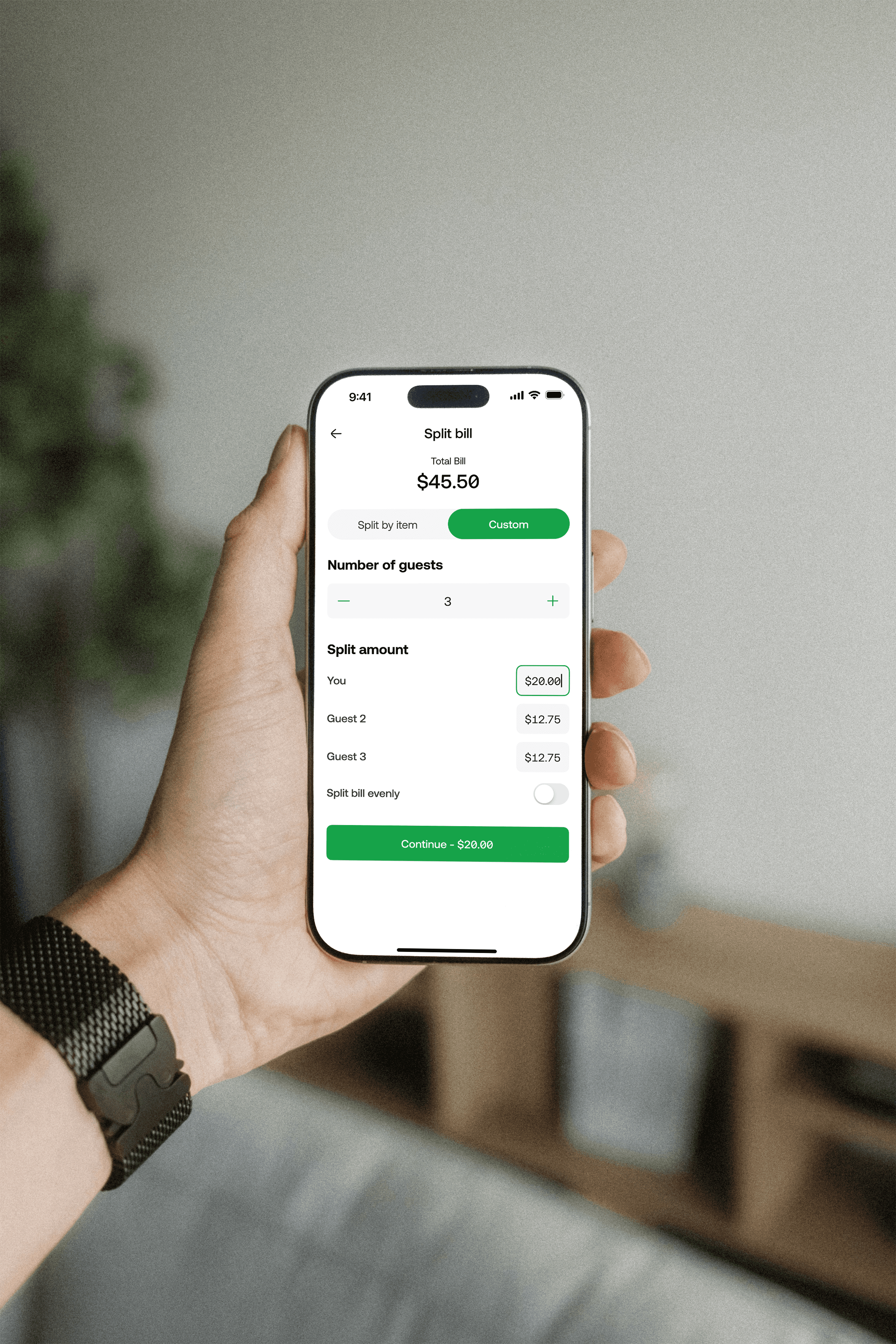
The payment flow adapted to match. For a single shared order, the first person to pay selects their items or enters a custom amount, completes their payment, and any items they have paid for are immediately locked and greyed out for subsequent payers.
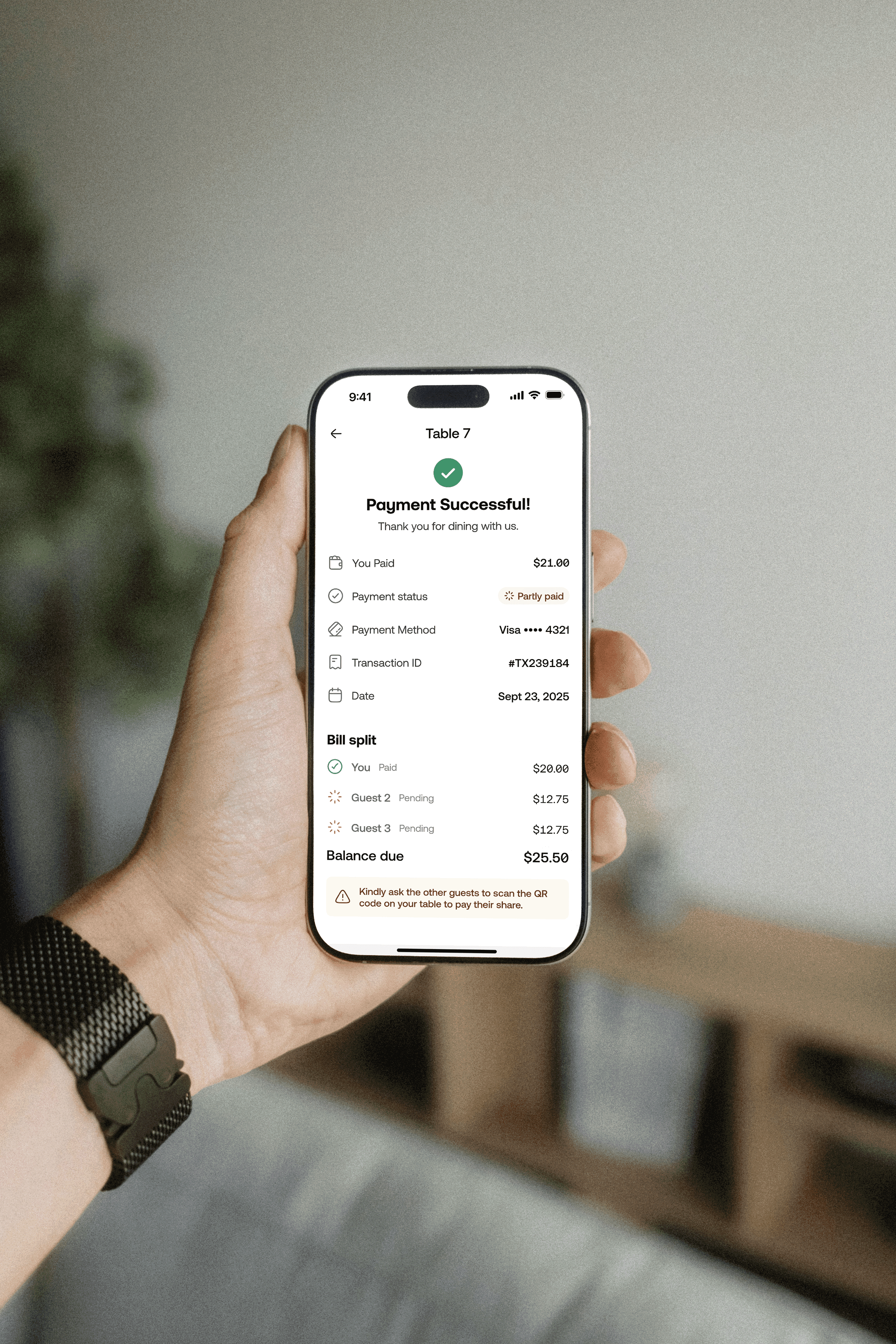
For separately placed orders, each guest simply selects their own order at checkout and pays only for what they ordered. Either way, when the next guest scans the QR code they land directly on the remaining balance. No coordination needed. No confusion about what has already been paid.
The hardest UX problem on the guest side was payment. When multiple people share a table, splitting the bill across different devices without real-time coordination is genuinely difficult to get right.
The solution was to make the QR code the persistent anchor for the entire table session. Guests could arrive at a shared bill in two ways. One person could place a single order on behalf of the entire group from their own phone. Or each guest could scan the same QR code and place their own order independently.
The payment flow adapted to match. For a single shared order, the first person to pay selects their items or enters a custom amount, completes their payment, and any items they have paid for are immediately locked and greyed out for subsequent payers.
For separately placed orders, each guest simply selects their own order at checkout and pays only for what they ordered. Either way, when the next guest scans the QR code they land directly on the remaining balance. No coordination needed. No confusion about what has already been paid.
SPLITTING THE BILL
The hardest UX problem on the guest side was payment. When multiple people share a table, splitting the bill across different devices without real-time coordination is genuinely difficult to get right.
The solution was to make the QR code the persistent anchor for the entire table session. Guests could arrive at a shared bill in two ways. One person could place a single order on behalf of the entire group from their own phone. Or each guest could scan the same QR code and place their own order independently.
The payment flow adapted to match. For a single shared order, the first person to pay selects their items or enters a custom amount, completes their payment, and any items they have paid for are immediately locked and greyed out for subsequent payers.
For separately placed orders, each guest simply selects their own order at checkout and pays only for what they ordered. Either way, when the next guest scans the QR code they land directly on the remaining balance. No coordination needed. No confusion about what has already been paid.

MANAGING THE FLOOR
MANAGING THE FLOOR
On the business side, the table management flow was the most complex to design. Restaurant staff needed to see the status of every table at a glance, across both mobile and desktop, and be able to act on that information instantly.
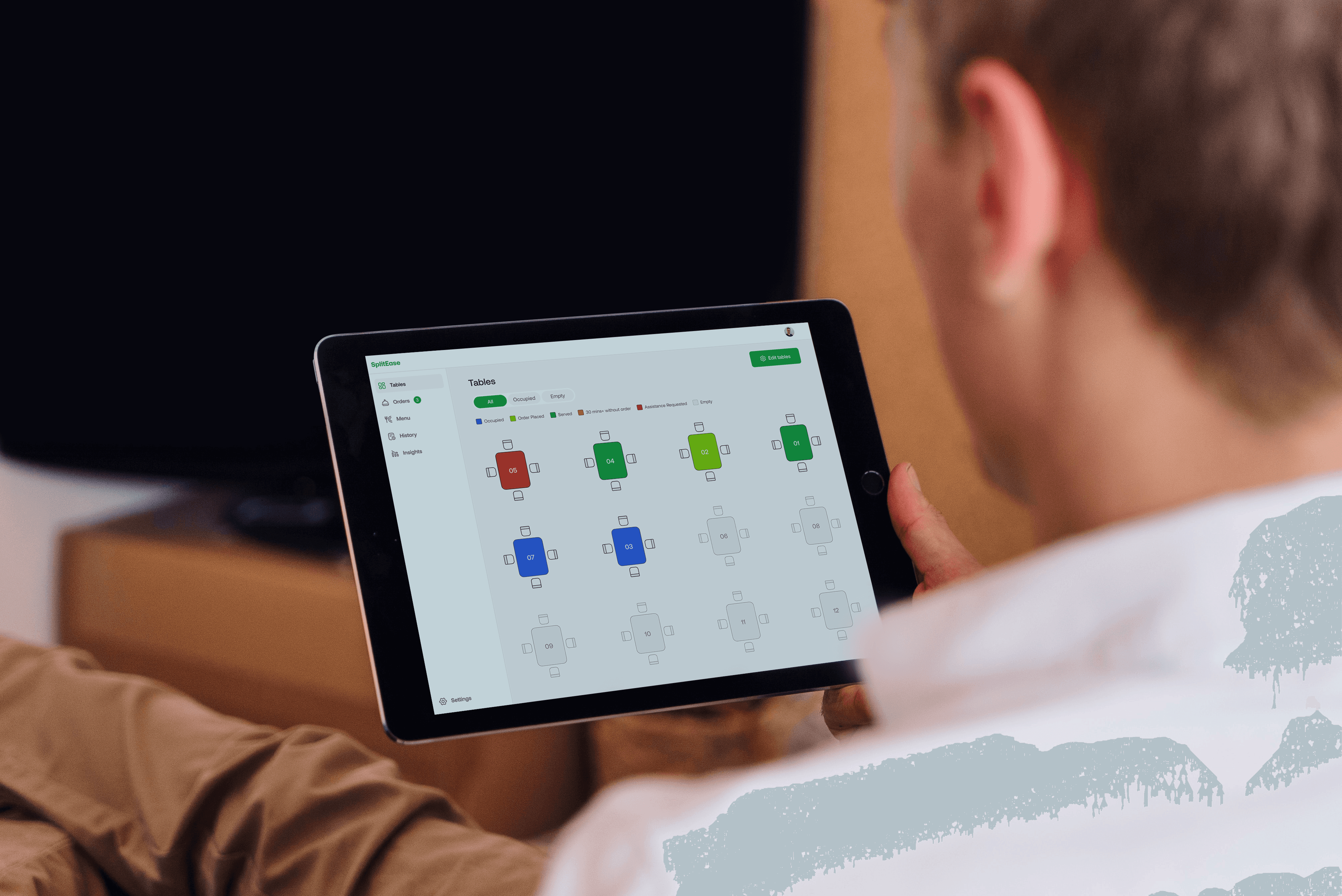
Each table is color-coded by status and activity. When a guest scans the QR code, the session begins and the table becomes active. Staff can track every stage in real time, from order placed and served, through to assistance requested. Tables that have gone 30 minutes without placing an order are flagged automatically, prompting staff to check in with the guests.
On the business side, the table management flow was the most complex to design. Restaurant staff needed to see the status of every table at a glance, across both mobile and desktop, and be able to act on that information instantly.
Each table is color-coded by status and activity. When a guest scans the QR code, the session begins and the table becomes active. Staff can track every stage in real time, from order placed and served, through to assistance requested. Tables that have gone 30 minutes without placing an order are flagged automatically, prompting staff to check in with the guests.
MANAGING THE FLOOR
On the business side, the table management flow was the most complex to design. Restaurant staff needed to see the status of every table at a glance, across both mobile and desktop, and be able to act on that information instantly.
Each table is color-coded by status and activity. When a guest scans the QR code, the session begins and the table becomes active. Staff can track every stage in real time, from order placed and served, through to assistance requested. Tables that have gone 30 minutes without placing an order are flagged automatically, prompting staff to check in with the guests.

STAFF MANUAL ORDER ENTRY
STAFF MANUAL ORDER ENTRY
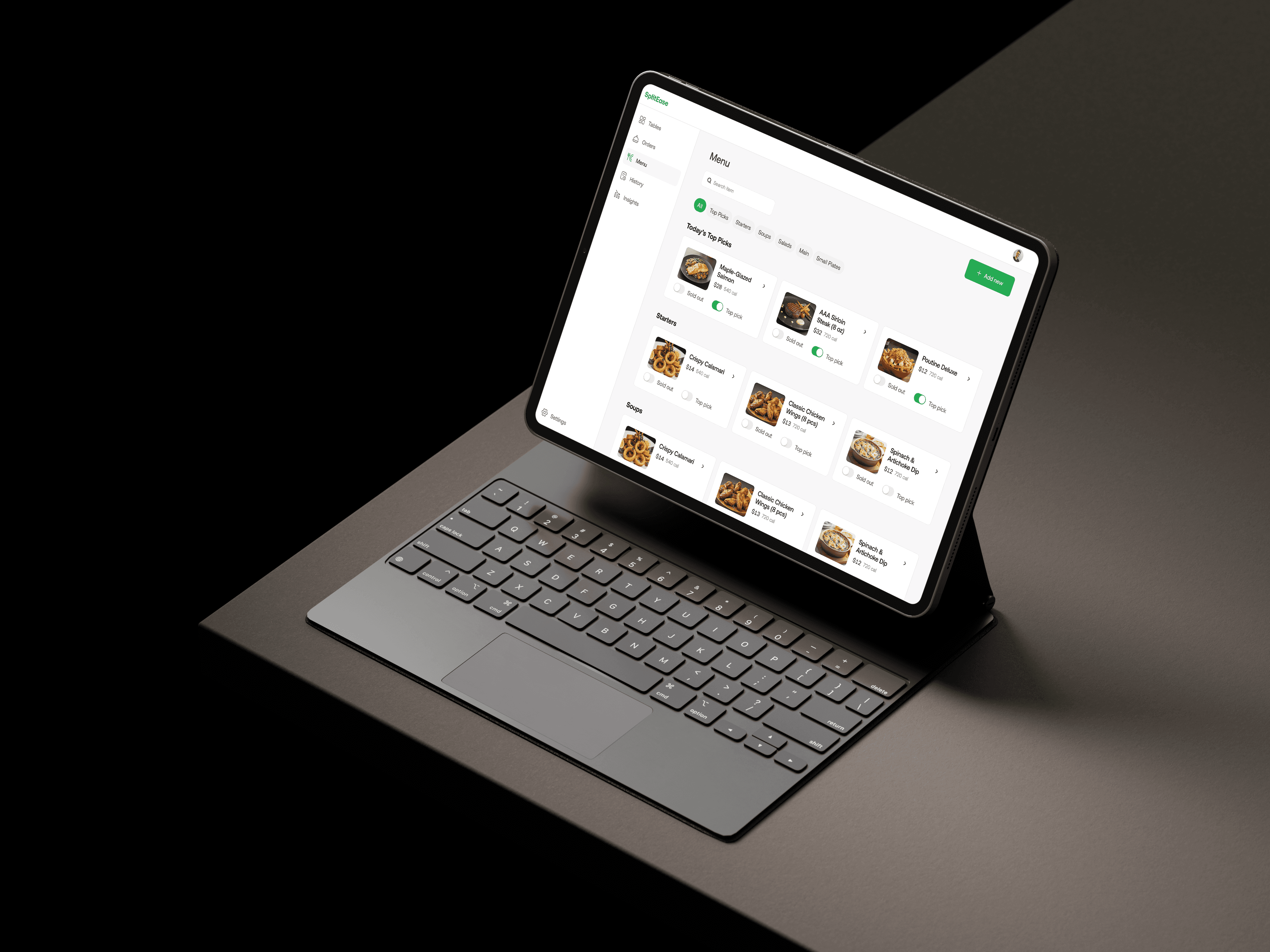
But visibility alone was not enough. Staff also needed the ability to intervene. So we built management controls directly into the dashboard. Tables flagged for inactivity can be snoozed. Sessions can be closed and reset between seatings. And for guests who prefer to order in person, staff can add items directly to any active table's bill from the dashboard. The order lands on the same bill as everything else, keeping the session intact regardless of how it was placed. The dashboard went from a monitoring tool to a management tool.
Clicking into any table reveals the full order history and payment status. Each table also has a unique QR code that can be printed as a PDF and placed on the physical table for guests to scan.
But visibility alone was not enough. Staff also needed the ability to intervene. So we built management controls directly into the dashboard. Tables flagged for inactivity can be snoozed. Sessions can be closed and reset between seatings. And for guests who prefer to order in person, staff can add items directly to any active table's bill from the dashboard. The order lands on the same bill as everything else, keeping the session intact regardless of how it was placed. The dashboard went from a monitoring tool to a management tool.
Clicking into any table reveals the full order history and payment status. Each table also has a unique QR code that can be printed as a PDF and placed on the physical table for guests to scan.
STAFF MANUAL ORDER ENTRY
But visibility alone was not enough. Staff also needed the ability to intervene. So we built management controls directly into the dashboard. Tables flagged for inactivity can be snoozed. Sessions can be closed and reset between seatings. And for guests who prefer to order in person, staff can add items directly to any active table's bill from the dashboard. The order lands on the same bill as everything else, keeping the session intact regardless of how it was placed. The dashboard went from a monitoring tool to a management tool.
Clicking into any table reveals the full order history and payment status. Each table also has a unique QR code that can be printed as a PDF and placed on the physical table for guests to scan.


Designing for Every Guest
Designing for Every Guest
Research showed that not every guest wants to order from their phone. Some prefer a physical menu. Others simply need help when something is not working. Designing only for digitally comfortable users would have left a real gap in the experience.
We built that expectation into the product at two levels. First, a table confirmation screen greets every guest the moment they scan, showing them exactly which table they are at before anything else loads. A simple detail, but one that catches wrong-table scans before they become a problem.
Second, guests can request assistance at any point in their session, choosing from a set of common issues or describing their own. Staff are notified immediately and dispatched to the table. Once a request is sent, the button enters a cooldown state, showing "A staff member is on their way" so guests know their request was received without sending duplicate alerts. It is a small feature with a big job: making sure no guest ever feels abandoned by the technology.
Research showed that not every guest wants to order from their phone. Some prefer a physical menu. Others simply need help when something is not working. Designing only for digitally comfortable users would have left a real gap in the experience.
We built that expectation into the product at two levels. First, a table confirmation screen greets every guest the moment they scan, showing them exactly which table they are at before anything else loads. A simple detail, but one that catches wrong-table scans before they become a problem.
Second, guests can request assistance at any point in their session, choosing from a set of common issues or describing their own. Staff are notified immediately and dispatched to the table. Once a request is sent, the button enters a cooldown state, showing "A staff member is on their way" so guests know their request was received without sending duplicate alerts. It is a small feature with a big job: making sure no guest ever feels abandoned by the technology.
Designing for Every Guest
Research showed that not every guest wants to order from their phone. Some prefer a physical menu. Others simply need help when something is not working. Designing only for digitally comfortable users would have left a real gap in the experience.
We built that expectation into the product at two levels. First, a table confirmation screen greets every guest the moment they scan, showing them exactly which table they are at before anything else loads. A simple detail, but one that catches wrong-table scans before they become a problem.
Second, guests can request assistance at any point in their session, choosing from a set of common issues or describing their own. Staff are notified immediately and dispatched to the table. Once a request is sent, the button enters a cooldown state, showing "A staff member is on their way" so guests know their request was received without sending duplicate alerts. It is a small feature with a big job: making sure no guest ever feels abandoned by the technology.
The Result
The Result
SplitEase launched with three restaurant partners in its pilot phase, streamlining the entire dining experience from the moment guests sit down to the moment they walk out. What previously required a waiter, a printed bill, and an awkward card machine handoff now happens entirely on the guest's phone.
By allowing guests to manage orders and payments independently, restaurants reported fewer payment-related interruptions during service. Staff spent less time coordinating split bills and more time focusing on the guest experience. And for guests, the ability to pay for exactly what they ordered, without negotiating with the person sitting next to them, was the feature that resonated most.
SplitEase launched with three restaurant partners in its pilot phase, streamlining the entire dining experience from the moment guests sit down to the moment they walk out. What previously required a waiter, a printed bill, and an awkward card machine handoff now happens entirely on the guest's phone.
By allowing guests to manage orders and payments independently, restaurants reported fewer payment-related interruptions during service. Staff spent less time coordinating split bills and more time focusing on the guest experience. And for guests, the ability to pay for exactly what they ordered, without negotiating with the person sitting next to them, was the feature that resonated most.
The Result
SplitEase launched with three restaurant partners in its pilot phase, streamlining the entire dining experience from the moment guests sit down to the moment they walk out. What previously required a waiter, a printed bill, and an awkward card machine handoff now happens entirely on the guest's phone.
By allowing guests to manage orders and payments independently, restaurants reported fewer payment-related interruptions during service. Staff spent less time coordinating split bills and more time focusing on the guest experience. And for guests, the ability to pay for exactly what they ordered, without negotiating with the person sitting next to them, was the feature that resonated most.
3
restaurant
partners at pilot launch
2
minutes
average checkout time
0
app downloads
across the entire guest experience
WHAT'S NEXT
WHAT'S NEXT
SplitEase is currently in active development with its pilot restaurant partners. The foundation is built. The system handles the full dining lifecycle, from the first scan to the final payment, across both guest and staff experiences.
The next phase focuses on analytics. Giving restaurant owners deeper insight into peak ordering times, popular menu items, and table turnover rates. The data is already there. The work ahead is making it visible and actionable. The best version of SplitEase is still being built.
SplitEase is currently in active development with its pilot restaurant partners. The foundation is built. The system handles the full dining lifecycle, from the first scan to the final payment, across both guest and staff experiences.
The next phase focuses on analytics. Giving restaurant owners deeper insight into peak ordering times, popular menu items, and table turnover rates. The data is already there. The work ahead is making it visible and actionable. The best version of SplitEase is still being built.
WHAT'S NEXT
SplitEase is currently in active development with its pilot restaurant partners. The foundation is built. The system handles the full dining lifecycle, from the first scan to the final payment, across both guest and staff experiences.
The next phase focuses on analytics. Giving restaurant owners deeper insight into peak ordering times, popular menu items, and table turnover rates. The data is already there. The work ahead is making it visible and actionable. The best version of SplitEase is still being built.
Next project Next Project
Next Project Next Project

